| AddressBookONE: Merge Address Books of Email, Facebook AddressBookONE is a free address book application. It is an online address book that enables you to gather your various contacts into one single place. The free address book software will help you to sync your various contacts stored in different destinations like your work email, social networking sites, MSN and various other sources. Sometimes it becomes very difficult to search for a particular contact from various sites since your contacts are scattered across the web sites and portals. This freeware will give you independence of maintaining contacts at one single place. In today’s world, we have so many contacts like friends, family and business contacts, which we really cannot afford to misplace. Main problem arises when you can not access a contact as you don’t remember the source where you saved it. In this scenario, AddressBookONE comes to your rescue. This free address book is very easy to use and will create one single point from where you can access all the contacts that you have stored in Yahoo, Facebook, LinkedIn and many others. You can also read Cliqset to integrate all your social networking accounts in one place. The free address book software supports access of the contacts from many popular sources that are used by people around the globe. For example if you have contacts scattered in your mail accounts like Gmail, social networking site like Facebook and business contacts like some in LinkedIn and you find it difficult to access the contacts due to so many sources, than you must use this very handy and free web portal AddressBookONE. The address book application aims at helping you with managing your contacts in a better way. You can read our article on Pop Peeper which helps you to access multiple email accounts at one place. The application not only helps you gather connections from the websites but also helps you to synchronize the contacts from your cell phones and PDAs. There are contacts in our phones that need to be managed well, easily accessed and constantly updated. You can synchronize the AddressBookONE with your phone or PDA and manage them easily, while they are always available to you. You can also read OutSync and Nomee to synchronize your email and social networking contacts. The main working of the freeware is to bring together your contacts which are scattered here and there and then help you to organize them into identifiable categories so that they are accessible to you. Since the application is a web portal you can connect to your AddressBookONE from anywhere in the world. The single web portal will help you to access your contacts no matter where they were saved, from next time when you want to use a contact just connect to the site. Or else you can synchronize the application with your cell phone and PDA and access the contacts when you wish. Features of free address book software: Single access point: all your contacts are gathered in this web portal for easy access Merge different fields of the same contacts and avoid duplicate entries and redundancy; to give a more complete single view for each contact record and eliminate duplicate data Synchronize your cell phones with the freeware Connect and sync your social networking site’s contacts from LinkedIn, Exchange and Facebook Manage your contacts like add news ones, update existing contacts, organize contacts in groups and categories and filter contacts AddressBookOne overall is useful for people who have lots of contacts stored in different locations and they need to access their contacts frequently. With this app they will not have to sign into different accounts to find the contacts. |
Wednesday, November 24, 2010
AddressBookONE


BExplorer: Add Tabs to Windows Explorer
|
Posted: 22 Nov 2010 11:00 PM PST
BExplorer also better known as better explorer provides tabbed windows file browsing. It is a replacement of standard windows explorer with additional features which makes its work more convenient. One of its features is addition of tabs in explorer, additional toolbars and many more. Some other free file explorers we reviewed earlier include CubicExplorer, and SE-Explorer.
BExplorer is mainly designed for the use of windows 7. Its interface provides with tab functionality and glassy view. It helps in changing of library icons, file operations, synchronized command prompt, folder icons may be changed, extended jump list support in windows 7, double panel explorer and many more. BExplorer works well with windows vista, for it to work on windows 7, aero feature must be on. Additionally there is a need of dot net framework.
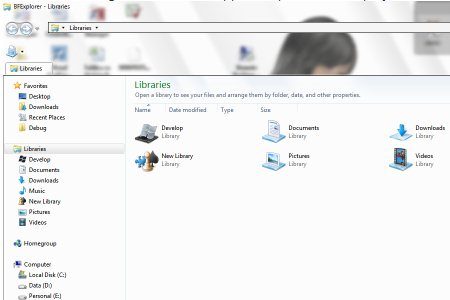
BExplorer is a simple to use software and has right balance of simplicity and full functionality. With it you can open multiple windows explorer windows in tabs under single BExplorer window. There is no need to switch file browser, all library and customization that you have applied to your windows explorer are available within the BExplorer. The utilities just bear a file size of about 1.5 MB use.
Also Check out: Free Replacements for Windows Explorer.
The mains features of BExplorer are:
When you download BExplorer you are provided with some of its added functionality like added toolbar in glass area, added view selection button, added library tools button, can create library and can change library icons, added menu to tabs, removed command bars, fixed exception if try to remove only one tab at a time, stability and performance fixes and many more.
So overall BExplorer provides an alternative to windows explorer, and provides features of tab browsing. It is easy to use and efficient in working. It has a flexible interface which makes the work more convenient.
So be fast in choosing BExplorer an alternative for Windows Vista and Windows 7 and check the full functionality of this software.
 |

Tuesday, November 23, 2010
folder Protector - Hide and Lock Folders
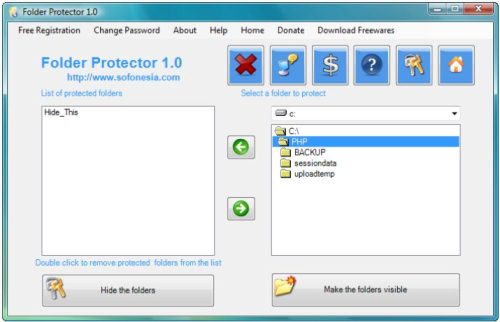
| Folder Protector: Hide and Lock Folders Folder protector is a free software to hide folders. Hiding all the folders as requested by the users ensures security and privacy of the private data. No other person can access your files and folders as this freeware, Folder protector has a password option for encryption of folders. You can hide folders as much as you can with this free software for hiding folders, Folder protector. The folders which are hidden will not appear on desktop screen and are fully secured with password protection. All your valuable data is safely secured with this folder hiding software and is safe from spyware activities. This software is free to download and has a very good and simple to use interface. Some of the features of Folder Protector: § You can easily hide folders in your PC § With a single click of a mouse all the folders again becomes visible § Your data is protected from unwanted users § Privacy is maintained in shared environment also where you are connected with a lot of people Similar software we reviewed earlier include: Secure Folder, Folder Soldier, and Folder Hidden. How to Hide Folders: § First of all you need to download the software from here. § After downloading you need to install this software on your PC. This free software for folder protection is very small in size, so you can easily use it remotely as it can be stored in a small pendrive of just 128 MB § After installation as you are using this software first time, so you need to enter the password and a security question in case you forget the password then you can recover it through this security question § Once you do all the formalities of entering the details then you will be navigated to the user interface window where you can simply choose a drive and in that drive a list of folders is visible. § So now select the folder you want to hide and select Hide the folders option § If you want to make the folders visible, you can select make the folders visible Folder Protector makes it extremely easy to hide folders, and password protect folders. |

Monday, November 22, 2010
Today's Free Software
 Comodo claim that their firewall is unique in that it passes all known leak tests to ensure the integrity of data entering and exiting your system. Comodo has put firewall through all kinds of sophisticated tests to ensure its firewall powerful enough to ward off these attacks with default settings. No other firewall has had to work this hard. Comodo claim that their firewall is unique in that it passes all known leak tests to ensure the integrity of data entering and exiting your system. Comodo has put firewall through all kinds of sophisticated tests to ensure its firewall powerful enough to ward off these attacks with default settings. No other firewall has had to work this hard. |
 FastPictureViewer, an image viewer designed for photographers. Now with powerful workflow tools helping to automate file management duties like copy, move, delete, save-for-web and more. FastPictureViewer, an image viewer designed for photographers. Now with powerful workflow tools helping to automate file management duties like copy, move, delete, save-for-web and more.  |
 Wireshark is the world's foremost network protocol analyzer, and is the de facto standard across many industries and educational institutions. Wireshark is the world's foremost network protocol analyzer, and is the de facto standard across many industries and educational institutions.  |
 WinPatrol alerts you to hijackings, malware attacks and critical changes made to your computer without your permission. As a multipurpose support utility, WinPatrol replaces multiple system utilities with its enhanced functionality. WinPatrol alerts you to hijackings, malware attacks and critical changes made to your computer without your permission. As a multipurpose support utility, WinPatrol replaces multiple system utilities with its enhanced functionality.  |
Saturday, November 20, 2010
SpeedCrunch - A Portable Freeware Desktop Calculator
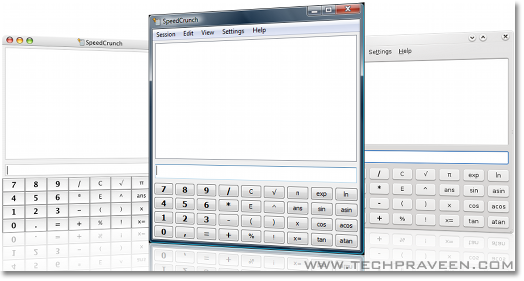
| SpeedCrunch – A Portable Freeware Desktop Calculator
Key Features of “Speedcrunch”: 1.At your fingertip: Just type the expression that you want to calculate and press Enter. You can see clearly what you typed along with the result in the scrollable display. Download: Speedcrunch | ||
| |
|